
Multi-Org Salesforce Governance, Simplified
Deep Dive into the Stood Flows Dashboard
Managing a multi-org Salesforce portfolio across enterprise business units usually means flying blind. Technical debt, bloated automation, and unused licenses quietly accumulate inside every instance—until system performance degrades and licensing costs balloon.
The updated Stood Flows Dashboard delivers a single-pane-of-glass overview across your entire multi-org estate. By pairing metadata analysis with actual usage data, Stood Flows translates complex org telemetry into clear, actionable governance.
Unified Portfolio Navigation & Baseline Comparative Analysis
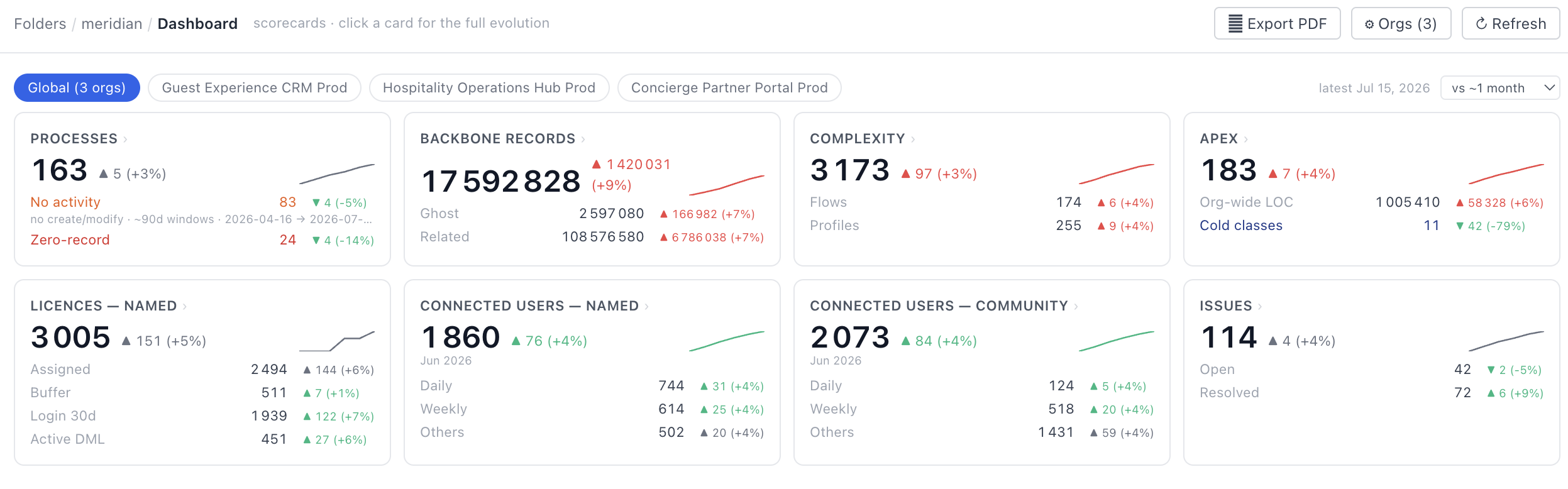
Effective governance requires context over time. Stood Flows handles multi-org complexity natively through flexible scoping and historical baseline metrics:
Scope Chips: Seamlessly toggle between a Global view that aggregates your entire org portfolio and individual org chips for isolated analysis.
Baseline Comparative Deltas ($\Delta$): Measure performance and growth against custom snapshots—including previous snapshots, ~1 month, ~3 months, or the initial capture. Color-coded deltas instantly signal whether metrics moved in a healthy direction.
Accurate Portfolio Math: Global deltas strictly evaluate orgs with historical snapshots, ensuring new org onboardings are never misreported as organic growth.
Drill-Down Evolution: Click any summary card to inspect sub-KPI evolution curves over time and individual org breakdown bars.
The 8 Core KPI Cards: Decoding Estate Health
1. Business Processes & Configuration Weight
Total Processes: Counts every distinct business path (backbone object $\times$ record type) to measure the structural width of your CRM.
Zero-Record & No-Activity: Identifies zero-record paths (never used) and no-activity processes (used once and abandoned). When these outpace total process growth, configuration is accumulating faster than business adoption.
2. Backbone Records & Data Mass
Backbone vs. Related Mass: Tracks core record mass against child objects to detect when child custom objects are inadvertently being used as system logs.
Ghost Records: Highlights data remaining in picklist stages or statuses that no longer exist in your current setup. These orphaned records fall outside active processes, escaping both automation and standard reporting.
3. Automation Complexity & Access Control
Complexity Score: Sums total flow complexity across your metadata. A rising Complexity Score alongside a flat flow count indicates that existing automation is growing heavier and more brittle.
Profiles Surface Area: Monitors total profile counts, highlighting expanding permission surface areas that require consolidation.
4. Apex Code Estate
Lines of Code (LOC): Measures the absolute size of your custom code footprint.
Cold Classes: Flags Apex classes with zero runtime execution during the analyzed period. Cold classes represent dead or abandoned logic, offering the safest starting point for code pruning.
5. Named License Optimization
The Utilization Funnel: Evaluates named licenses across a multi-tier funnel: Paid $\rightarrow$ Assigned $\rightarrow$ Logged In (30d) $\rightarrow$ Active DML.
DML Reality Check: Measures users performing Active DML (creating or modifying data) against those merely logging in. A wide gap highlights users who view Salesforce but execute work elsewhere, opening immediate license downgrade opportunities.
6 & 7. User Depth (Named & Community)
Engagement Tiers: Groups active internal and external portal users into Daily ($\ge 20$ active days in trailing 28), Weekly (4–19 days), and Others.
Adoption Quality: Exposes whether an org is truly load-bearing for operational teams or merely serving as an occasional lookup tool.
8. Remediation & Issue Tracking
Reported, Open, & Resolved: Provides an integrated issue tracker that converts technical findings into an actionable backlog. Comparing open backlog against resolved throughput demonstrates whether architectural findings are actively being remediated over time.
Consolidate Your Multi-Org Architecture
Stop auditing instances in silos. Stood Flows gives enterprise architects, RevOps leaders, and Salesforce administrators the data needed to eliminate bloat and optimize spend across every org in the portfolio.
🔎 Ready to simplify your Salesforce architecture? Book a Demo with Stood CRM